How I Made Weekly Reports Write Themselves
You know that thing where it’s Monday morning and you need to write the weekly report, but you can’t remember what actually happened last week? So you spend 30 minutes scrolling through emails and Teams channels? Yeah, we automated that. We built this during a Microsoft Copilot Studio workshop, just playing around with what was possible. It’s not revolutionary, but it saves us 45 minutes every week.
The small win
We built a workflow that pulls from a specific Outlook project folder, a Teams project channel, and a OneDrive project folder, then generates a structured report on its own. Trigger it Sunday night or Monday morning, and the report just shows up in our inbox.
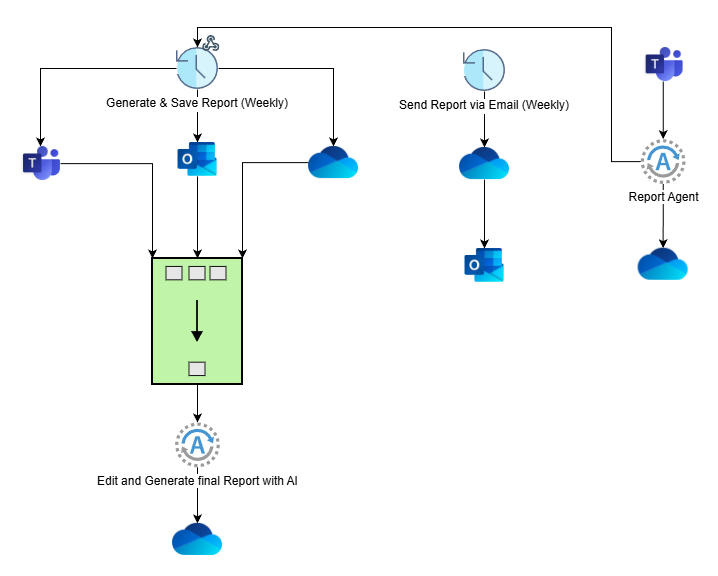
There are three pieces. The first workflow connects to Outlook, Teams, and OneDrive, hands everything to an AI agent that writes a structured summary with sections for decisions, tasks, and updates, then saves it back to OneDrive. The second workflow grabs that report and emails it to the team distribution list. Finally, an agent hangs off a dedicated Teams channel so anyone can ask about old reports, like “what did we decide about the API timeline?”
The boring part is the point
This weekly report automation is fine. It works. It is also the least interesting thing you can do with Copilot Studio.
The pattern underneath it is the useful bit: gather data from multiple sources, process it with AI, distribute the result. That shape fits a lot of jobs. You can pull PRs from GitHub, run an analysis, and post summaries to Slack. You can watch Zendesk for urgent tickets and page whoever is on call. You can hit CRM APIs for a pipeline report, scan Confluence for pages that have gone stale, or watch cloud metrics and write up incidents when something looks wrong.
The real possibilities
The ecosystem is where it gets interesting. MCP lets agents use tools the way a person would: browsing the web, running CLI commands, querying databases, calling APIs. That is the difference between an agent that reads your data and one that acts on it.
Copilot Studio itself connects to most things you already pay for. Salesforce, Jira, Linear, HubSpot, GitHub, Stripe. If it has an API, your workflow can talk to it. That includes your own internal tools: expose one over an API and the workflow can use it like anything else. We started querying an internal dashboard conversationally instead of clicking through it, which sounds like a small thing and isn’t.
You can also chain agents. Our report uses two, but there’s no reason to stop there. One gathers, one analyzes, one writes, one checks the writing for accuracy. Each stays narrow enough to be good at its job.
What this actually means
The weekly report was just our entry point. We needed something practical that would save time immediately. But once you understand the pattern, you start seeing automation opportunities everywhere:
- That spreadsheet you update manually every Friday? Automate it.
- Those status emails you send to stakeholders? Automate it.
- The meeting prep where you hunt through notes? Automate it.
Where it falls down
Setup took us a couple of hours the first time, mostly spent working out which data sources we actually cared about. That part doesn’t get automated for you: if you can’t say where the information lives, neither can the agent. Anything with real branching logic still needs a human reading the output before it goes anywhere. And token costs are quiet until you point it at a large volume, then they aren’t.
For repetitive work that follows a predictable shape, though, it holds up well.
Try it
Start small. Pick one annoying weekly task that follows a pattern, wire up the basic gather-process-distribute flow, and run it by hand a few times before you automate the trigger. Once you see it work, the bigger opportunities tend to find you.
None of this replaces the job. It clears the repetitive layer off the top so there’s room for the actual work.
Resources: