Automate Weekly Reports Effortlessly with Copilot Studio
You know that thing where it’s Monday morning and you need to write the weekly report, but you can’t remember what actually happened last week? So you spend 30 minutes scrolling through emails and Teams channels? Yeah, we automated that. We built this during a Microsoft Copilot Studio workshop just playing around with what was possible. It’s not revolutionary, but it saves us 45 minutes every week.
The Small Win
Here’s what we built: a simple workflow that pulls data from a specific Outlook project folder, Teams project channel, and OneDrive project folder, then generates a structured report automatically. Trigger it Sunday night or Monday morning, and the report just… shows up in our inbox.
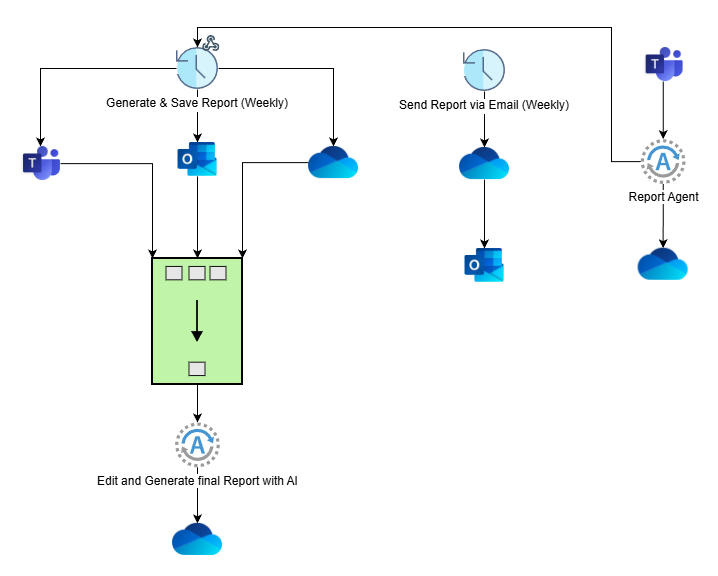
The setup:
Workflow 1 (Generation):
- Connects to Outlook (filtered emails), Teams (channel messages), OneDrive (documents)
- AI agent combines everything into a structured summary with sections for decisions, tasks, updates
- Saves report to OneDrive
Workflow 2 (Distribution):
- Grabs the latest report from OneDrive
- Emails it to the team distribution list
Agent (Teams Integration):
- Connected to a dedicated Teams channel
- Lets anyone query past reports by asking questions like “What decisions about the API timeline?”
But Here’s the Thing
This weekly report automation? It’s fine. It works. But it’s honestly the least interesting thing you can do with Copilot Studio.
The pattern here - gather data from multiple sources, process with AI, distribute results - that’s applicable to almost anything:
- Code reviews: Pull PRs from GitHub, run AI analysis, post summaries to Slack
- Support tickets: Monitor Zendesk/Intercom, categorize urgent issues, alert on-call team
- Sales data: Connect to CRM APIs, generate pipeline reports, notify stakeholders
- Documentation: Scan Confluence/Notion pages, flag outdated content, suggest updates
- Infrastructure: Monitor cloud metrics, detect anomalies, create incident reports
The Real Possibilities
What’s actually interesting is the ecosystem you can tap into:
MCP (Model Context Protocol): This lets AI agents interact with tools the same way humans do. Your agent can browse the web, use CLI tools, query databases, call APIs. It’s not just reading data, it’s doing things.
API Connections: Copilot Studio connects to basically everything - Salesforce, Jira, Linear, HubSpot, GitHub, Stripe, you name it. If it has an API, your workflow can talk to it.
Custom Integrations: Built a custom internal tool? Expose it via API and your Copilot workflow can use it. You can apply this same pattern to internal dashboards, querying them conversationally instead of clicking through reports.
Multi-Agent Workflows: This report example uses two agents. But you can chain multiple agents: one gathers data, one analyzes, one writes the summary, one reviews for accuracy. Each specializes.
What This Actually Means
The weekly report was just our entry point. We needed something practical that would save time immediately. But once you understand the pattern, you start seeing automation opportunities everywhere:
- That spreadsheet you update manually every Friday? Automate it.
- Those status emails you send to stakeholders? Automate it.
- The meeting prep where you hunt through notes? Automate it.
The Limitations (Being Real)
- Setup takes 1-2 hours the first time
- You need to understand your data sources
- Complex logic still requires human oversight
- Token costs add up if you’re processing huge volumes
But for the 80% of repetitive tasks that follow a pattern? This works.
Try It
Start small. Pick one annoying weekly task that follows a pattern. Set up the basic gather-process-distribute workflow. Run it manually a few times, then automate the trigger. Once you see it working, you’ll spot bigger opportunities.
This isn’t about replacing your job. It’s about stopping the repetitive stuff so you can focus on the actual work.
Resources: